Lead follow-up in minutes
- New lead
- CRM
- AI qualifies
- Tailored reply
- Booked call
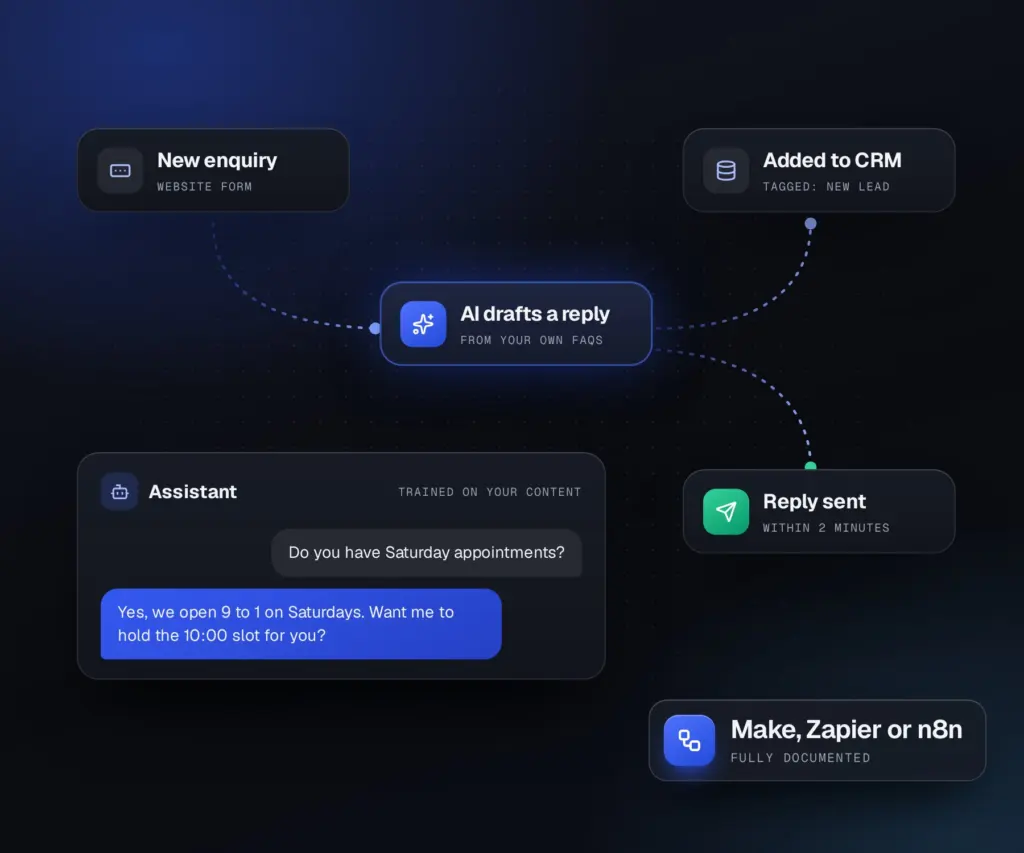
Form entries are logged, scored against your criteria and answered with a tailored reply and your booking link, even at night.


AI automation services for small businesses: new leads followed up in minutes, replies drafted for you, and assistants that answer from your own content. Built in tools you own.


01Quick answer
It handles the repetitive work between your tools: logging leads, sending follow-ups, drafting replies and summaries, sorting enquiries and producing reports. AI automation for small businesses works best when it starts with one task your team repeats every day.
02What you get
What you get from an AI automation expert who builds around the tools you already use and documents every workflow.
03Who it is for
Most of these clients are in the US, UK, Canada and Australia, and I have worked with clients in 70 countries.
Not the right fit if the plan is to replace real client care with a chatbot.
Enquiries answered, calls booked and follow ups sent without you copying anything by hand.
Forms, email, CRM and documents connected, so work moves on its own.
Automations for your client funnels and reports, built and documented for your team.
04Sound familiar?
Enquiries sit in an inbox while you work, and some never hear back.
Details are moved between forms, sheets, CRM and email by hand.
You answer the same questions again and again, when the answers are already written down.
05In practice
The four automations small businesses ask for most. Each runs in tools you own, with your approval wherever it matters.
Form entries are logged, scored against your criteria and answered with a tailored reply and your booking link, even at night.
Long enquiries become a short summary with the budget, deadline and next step pulled out, saved to the contact record.
Requests are tagged by topic and urgency and routed to the right person, with a suggested answer from your help docs.
Drafts for posts, emails or social are produced on a schedule and wait for your approval before anything goes live.
06How it works
Send a short brief or book a call. I reply within one working day with questions or next steps.
You get the scope, the price and a dated plan in writing before any work starts.
Built and tested on a staging copy, with an update after each milestone.
It goes live at a quiet time, I check everything again, and you get a recorded walkthrough and notes.
07Why work with me
You talk to the person doing the work, from the first call to launch day. The domain, hosting, content and code stay in your accounts, and the price is agreed before anything starts.
More about me08Reviews
Real feedbackEvery review comes from a Fiverr or Google client, shown as written.
I’ve worked with Sukesh multiple times, and the consistency is what really stands out. He’s efficient, professional from start to finish, and always delivers on time. He pays close attention to detail, communicates…
I had an amazing experience working with Sukesh. He designed a professional website and logo for me, answered all my questions, and even created an instructional video so I can easily update my site on my own. He was…
Sukesh was great to work with. The website he built for me worked perfectly. He was quick to respond, even with the time difference. I highly recommend him. You will not disappointed.
It can be, with care. I keep sensitive data out of AI tools unless you approve it, use accounts you own, and document every automation so you know exactly what runs.
n8n, Make or Zapier for workflows, and AI models from providers such as OpenAI or Anthropic through accounts you own. The choice depends on what you already use and your budget.
It depends on the steps and tools involved. I start with one workflow, send a fixed quote, and we add more once it proves its value.
No. AI workflow automation takes over repetitive steps so your team spends its time on work that needs a person.
Yes. Most forms, CRMs, calendars and email tools can be connected directly or through Make, Zapier or n8n.
A single workflow usually takes a few days to two weeks, including testing with real examples. Bigger systems are built one workflow at a time.
Access to the tools involved, such as your forms, CRM and email, a few real examples of the task, and the rules a person would follow to do it.
Automating a messy process before simplifying it, letting AI send messages unchecked where accuracy matters, and nobody knowing how the workflow runs. Every workflow I build is tested and documented first.
Pairs well with
Booking new projects
Tell me which task eats your week. I will show you how much of it can run on its own.

Usually replies within 4 hours9 AM to 11 PM, Bangladesh time
 Sukesh Das
Web designer and developer
Today
Hi, I'm Sukesh. Thanks for stopping by.
Tell me a little about your website and what you need. I will reply on WhatsApp with the next steps.
Before you go
I will check your site by hand for speed, mobile, SEO and the things that cost you enquiries, then email you a short report with the fixes in order of priority. No sales call, no obligation.