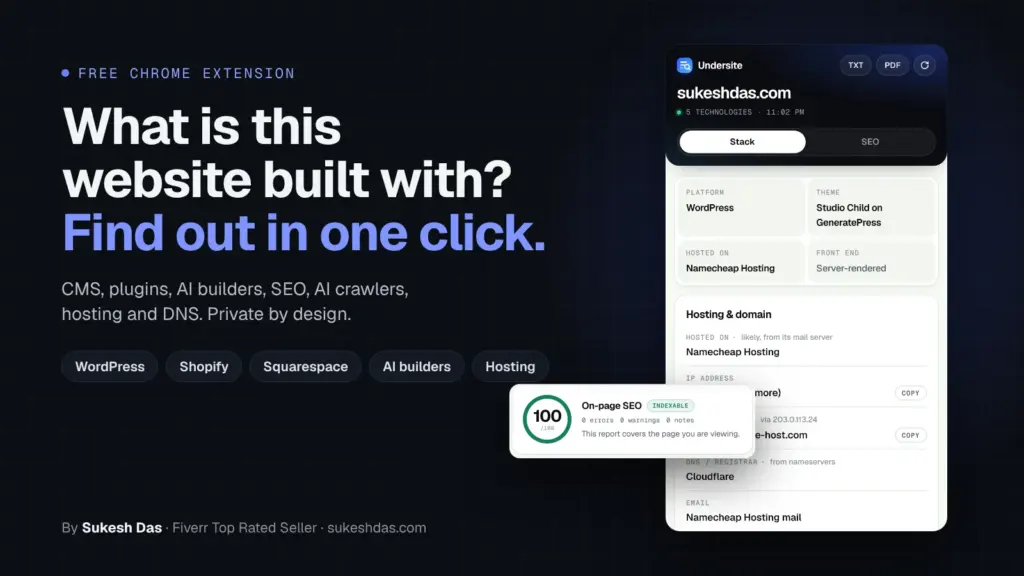
The fastest way to find out what a website is built with is a free Chrome extension called Undersite. Open the site, click the icon, and in about two seconds you see the platform, page builder, WordPress plugins and whether they are outdated, 24 kinds of tracking codes, fonts, email provider, the real host behind Cloudflare, every published page, an SEO score and which AI crawlers can read the site. It is free, needs no account and sends nothing about you anywhere.
Why I built my own website checker
I’m Sukesh Das. I have built more than 1,200 websites since 2018, and almost every working day starts the same way: someone sends me a link. “Can you build something like this?” “Why is our site not on Google?” “Who even hosts this?”
For years my answer meant a little ritual. One extension for the CMS, another to guess the WordPress theme, a third for pixels. A DNS website for the host, another for the email provider. A font inspector. An SEO extension. Then robots.txt and the sitemap opened by hand to count pages. Ten minutes and a dozen tabs, and some of those tools were quietly tracking my browsing or giving confident wrong answers.
So I built one tool for myself that did all of it in Chrome’s side panel. I used it on real client work for weeks, fixed everything that annoyed me, and once the old ritual was completely gone I published it free for the community and my clients. This guide walks through every feature, using scans of my own site.

What Undersite replaces
| What I used to open | What Undersite shows instead |
|---|---|
| A CMS detector extension | Platform, theme or builder, host and front end in the first card |
| A WordPress theme detector | Theme, child theme, plugins with versions and an update check |
| A pixel or tag checker | 24 tracking and marketing platforms with copyable IDs |
| A font inspector | Typography card with fonts and sizes |
| DNS and hosting lookup sites | Host, origin server, DNS, email provider, raw records, sites on the same IP |
| robots.txt and sitemap by hand | Every published URL grouped by post type, one click to copy |
| An SEO extension | Score out of 100 with plain-language findings |
| Nothing (no tool did this) | AI search visibility for 12 AI crawlers plus llms.txt |
How does Undersite detect a website’s tech stack?
Every platform leaves fingerprints: file paths like /wp-content/, JavaScript objects, class names, meta tags and server headers. Undersite matches those against around 180 technology signatures and shows a confidence bar and the evidence for each result. If a site hides something, it says “unknown” instead of guessing.
The first card answers the four questions I always ask first: platform, theme or builder, hosted on and front end. Below it, results are grouped:
- 27 CMS and site platforms, including WordPress, Shopify, Squarespace, Wix, Webflow, Framer, Ghost, Drupal, Joomla, HubSpot CMS, Kajabi, Duda and Carrd.
- 11 AI website builders: Lovable, Bolt.new, v0, Durable, 10Web, Base44, Readdy, Hostinger Website Builder, Dorik, B12 and Gamma, with a clear “built with AI” note.
- 9 e-commerce platforms such as WooCommerce, Magento, BigCommerce, PrestaShop and Ecwid.
- 16 frameworks and 10 libraries, from React, Next.js, Vue, Astro and SvelteKit to jQuery, Tailwind and GSAP.
- 10 chat and AI assistants including Intercom, Tidio, Crisp, Tawk.to, Zendesk, Chatbase and Voiceflow.
- Payments, security tools like reCAPTCHA and Cookiebot, CDNs and web servers.
Can Undersite detect CMS and plugin versions?
Yes, wherever the site makes the version public. Knowing the version tells you how old a site is and how much work an update or rebuild will take. Undersite reads versions for:
- CMS platforms: WordPress core, Squarespace (7.0 or 7.1, and whether the site uses Fluid Engine), Drupal, Joomla, Ghost, Framer and Jimdo.
- WordPress themes and plugins: the active theme and every plugin that loads files on the page, including Elementor, Kadence Blocks, Fluent Forms, WooCommerce and Easy Digital Downloads.
- Libraries: jQuery and Bootstrap.
Many sites hide their versions on purpose, mine included, as a security measure. When a version is not public, Undersite shows the technology without one rather than guessing.
Which page builders can it detect?
Elementor, Divi, Bricks, Beaver Builder, Oxygen, WPBakery, Kadence Blocks and the WordPress Block Editor. For me this answers the client’s real question, “will I be able to edit it myself?”, before the first call.
How do I check if a site’s WordPress plugins are up to date?
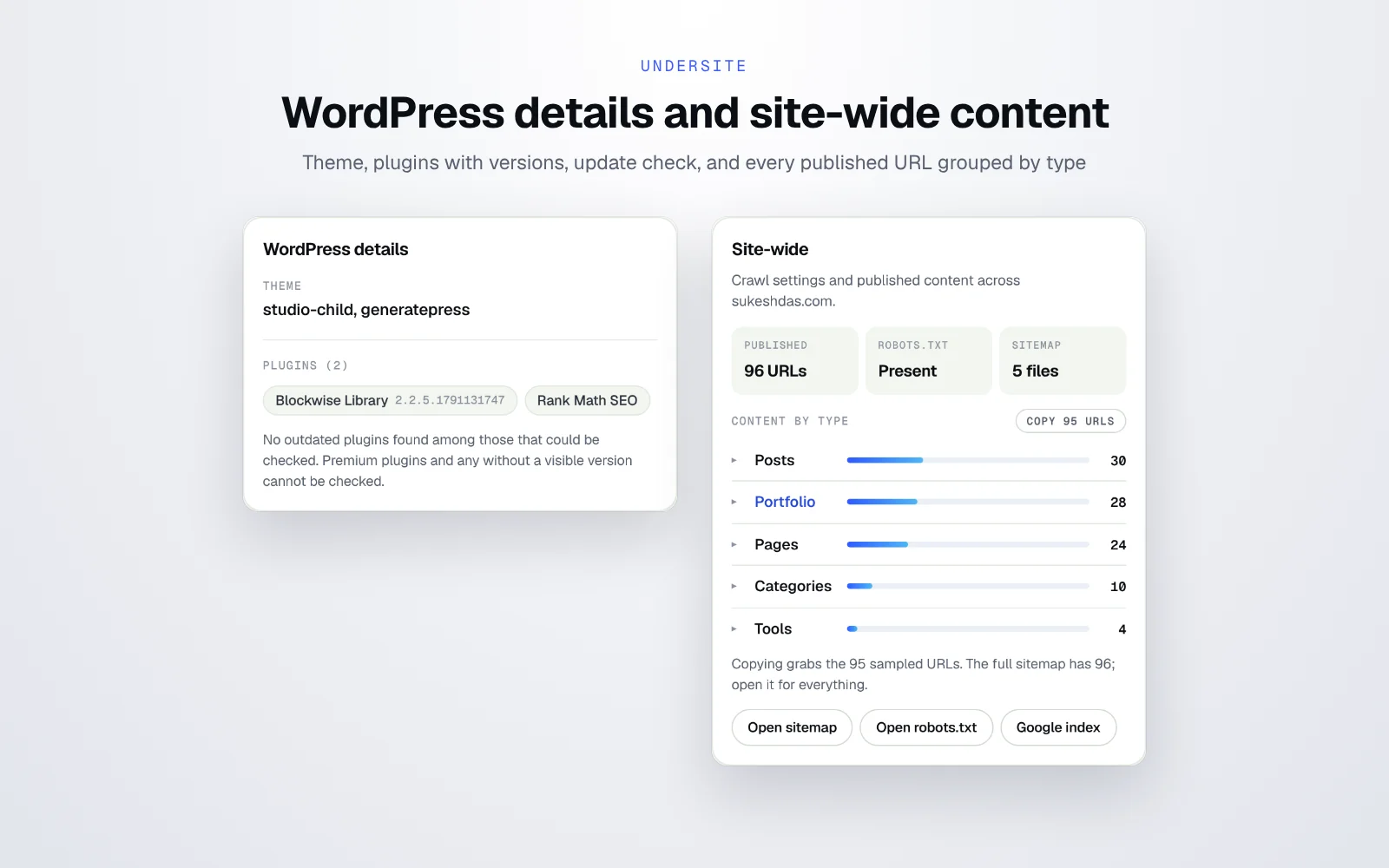
On any WordPress site, the WordPress details card lists the core version, the active theme and child theme, and the plugins loading on the page with their versions. Press Check plugins for updates and Undersite asks the official WordPress.org directory for the latest versions, then flags anything outdated in red. It also recognises Yoast, Rank Math, All in One SEO, SEOPress and The SEO Framework.
Premium plugins and plugins that load nothing on the front end cannot be checked from outside, and Undersite tells you that honestly.
How many posts, pages and custom post types does a site have?
The site-wide card answers this in one look. Undersite reads robots.txt and every sitemap file, counts the published URLs and groups them by type: posts, pages, products, categories and any custom post type. On my site it shows 30 posts, 28 portfolio items, 25 pages, 10 categories and 4 tools.
- One-click copy for each post type, or every URL at once. Perfect for migrations, redirects and content audits.
- Quick links to open the sitemap, open robots.txt, and run a Google index check (a site: search in a new tab, so Undersite itself never contacts Google).
- No sitemap? No problem. If it is missing or broken, Undersite discovers pages from the site navigation instead.
How Undersite helps you quote a website redesign
This is the job I built it for. Before I can send a redesign quote I need to know how big the site is and what it runs on. I used to email the client a list of questions: how many pages, how many blog posts, do you have products, who is your host, which email do you use, which tracking do you need to keep? Half the time they did not know.
Now I open their site and click once. Undersite gives me the platform and version, the page builder, the plugins, the exact count of pages, posts, products and custom post types, the host, the email provider and every tracking code that must survive the move. I can send an accurate quote the same day, without a single back-and-forth email, and export the scan as a PDF to attach to the proposal.
Which tracking codes and pixels does Undersite find?
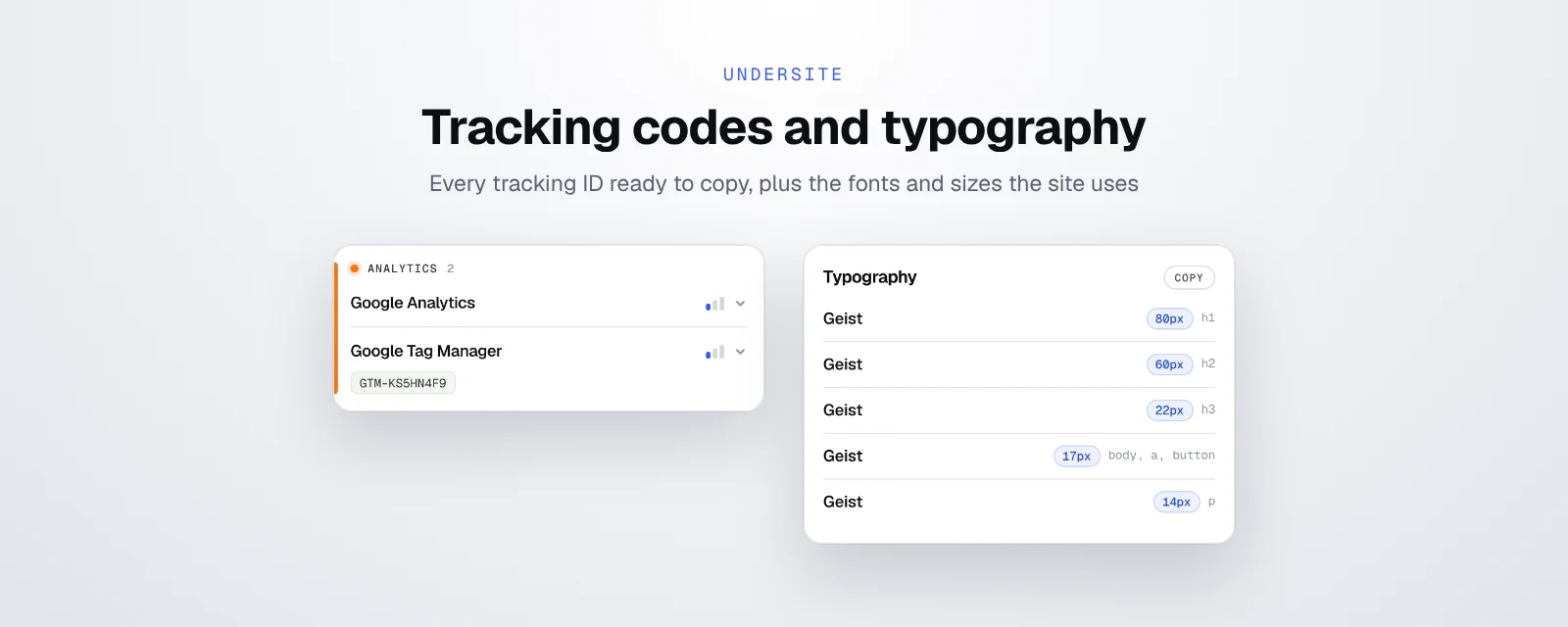
This is where I used to need the most extensions. Undersite covers 24 tracking and marketing platforms in one place, and shows each tracking ID with a copy button:
| Type | Platforms |
|---|---|
| Analytics (13) | Google Analytics, Google Tag Manager, Meta Pixel, Microsoft Clarity, Hotjar, Mixpanel, Amplitude, PostHog, Segment, Matomo, Plausible, Fathom, Yandex Metrica |
| Ads and pixels (7) | Google Ads, Microsoft Advertising UET, LinkedIn Insight Tag, TikTok Pixel, Pinterest Tag, Snap Pixel, X (Twitter) Pixel |
| Marketing tools (4) | HubSpot, Klaviyo, Mailchimp, GoHighLevel |
It is just as useful on your own site: you can check in seconds that your Tag Manager container and pixels are actually firing on the page.
Can it tell me which fonts a website uses?
Yes. The typography card lists the font family and size for H1, H2, H3, body text and buttons, and copies the full set with one click. It also detects Google Fonts and Adobe Fonts.
How do I find a website’s host and email provider?
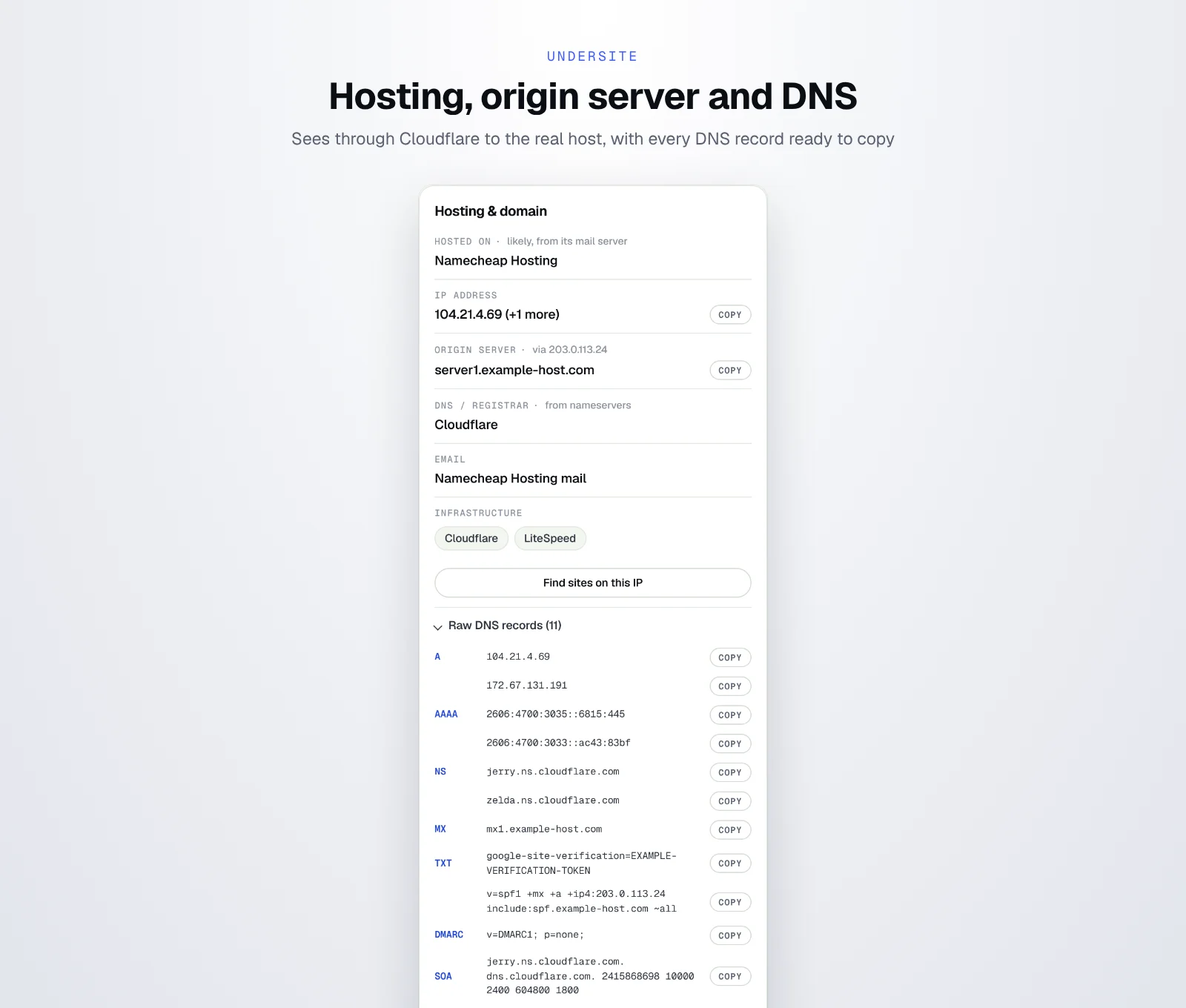
The hosting card shows the host and how it was identified, the IP address, origin server, DNS provider and email provider, plus infrastructure like Cloudflare or LiteSpeed. All raw DNS records (A, AAAA, NS, MX, TXT, DMARC and SOA) have copy buttons.
- 40+ hosts and DNS providers, including Hostinger, SiteGround, Bluehost, GoDaddy, Namecheap, Kinsta, WP Engine, Cloudways, DigitalOcean, AWS, Vercel and Netlify.
- 12 email platforms: Google Workspace, Microsoft 365, Zoho Mail, Proton Mail, Fastmail, Titan Email, iCloud Mail, Yandex 360, Cloudflare Email Routing, Namecheap Private Email, Rackspace Email and Mailgun.
- The real host behind Cloudflare. Most tools stop at “Cloudflare”. Undersite follows the site’s own mail server to the origin host where it can.
- Find sites on this IP. One optional click lists other domains sharing the same server, a quick way to tell shared hosting from a dedicated machine.
What does the SEO check look at?
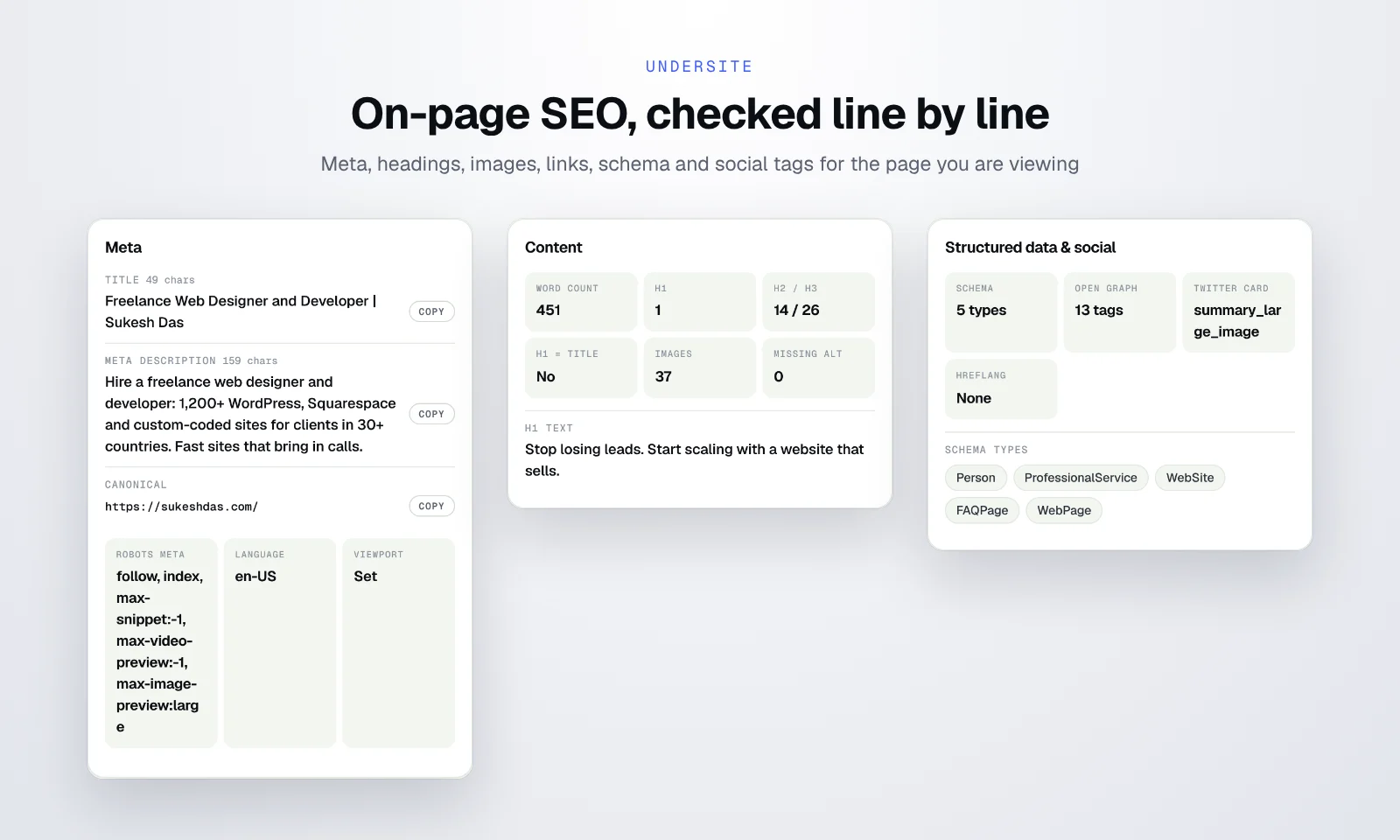
The SEO tab scores the page out of 100, shows whether it can be indexed, and counts errors, warnings and notes. Every finding is explained in plain words, such as a meta description that Google will cut off, or headings that skip a level.
| Section | What it checks |
|---|---|
| Meta | Title and length, meta description and length, canonical, robots meta, language, mobile viewport |
| Content | Word count, H1 count and text, H2 and H3 counts, H1 versus title, images and missing alt text |
| Technical | HTTPS, mixed content, charset, favicon, internal and external links |
| Structured data and social | Schema types, Open Graph tags, Twitter Card, hreflang |

How do I check if a site is visible to ChatGPT and other AI search?
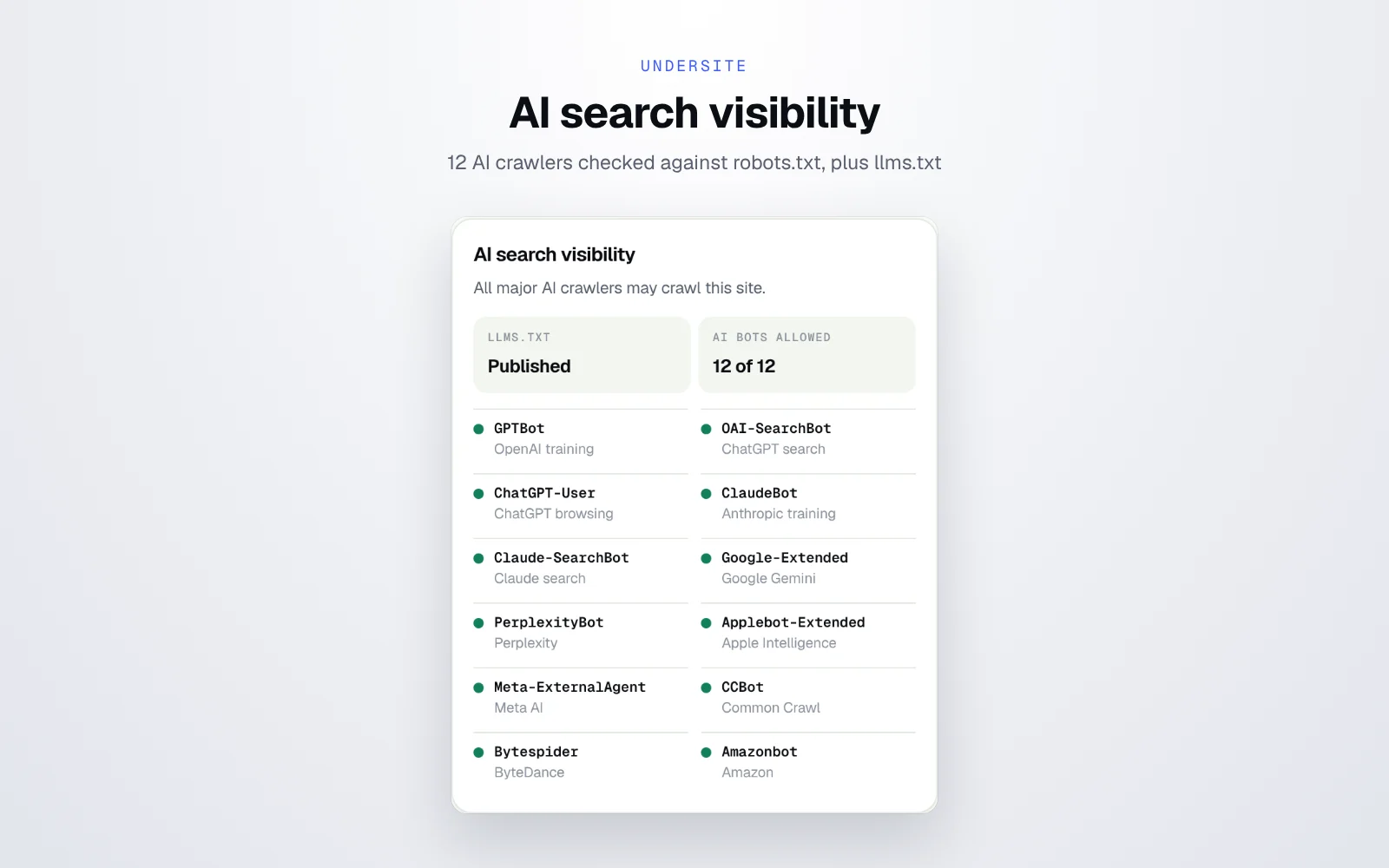
No tool I used did this, so I built it in. The AI search visibility section reads robots.txt and shows whether 12 AI crawlers are allowed or blocked, each labelled with what it does: GPTBot (OpenAI training), OAI-SearchBot (ChatGPT search), ChatGPT-User (ChatGPT browsing), ClaudeBot, Claude-SearchBot, Google-Extended (Gemini), PerplexityBot, Applebot-Extended (Apple Intelligence), Meta-ExternalAgent, CCBot (Common Crawl), Bytespider and Amazonbot. It also tells you whether the site publishes an llms.txt file.
When a client asks why AI tools never mention them, this section often gives the answer in seconds. My GEO checklist covers what to do next.
Can I export a report or scan automatically?
Yes to both. TXT downloads the full scan as a text file and PDF opens a printable report you can save and attach to a proposal. Turn on Allow scanning on every tab and Undersite scans as you switch tabs, which is ideal for competitor research. The panel follows your light or dark system theme.
Is Undersite private and safe?
I built it with the rules I wanted from every other tool:
- No account, no analytics, no tracking, no ads and no Undersite server.
- It reads a tab only after you click its icon, unless you turn on auto-scan.
- Analysis runs on your device. Only the scanned hostname goes to a public DNS resolver for the hosting lookup.
- Results stay in session memory and disappear when Chrome closes.
- The plugin update check and sites on this IP lookup are optional and ask permission the first time.
- It never does things that help attackers, like listing WordPress usernames.
Everything is spelled out in my extensions privacy policy.
How do I use Undersite?
- Add Undersite from the Chrome Web Store and pin it to your toolbar.
- Open any website and click the Undersite icon. The side panel opens and the scan starts.
- Read the Stack tab, switch to SEO, and export a report if you want to keep it.
Website technology checker FAQs
How can I tell what a website is built with?
Use a free extension like Undersite. Open the site, click the icon, and it shows the platform, page builder, plugins, frameworks, tracking codes, hosting and more in about two seconds.
How do I check if a site’s WordPress plugins are outdated?
Undersite lists the plugins loading on the page with their versions. Press Check plugins for updates and it compares them with WordPress.org and flags outdated ones in red.
How many tracking platforms does Undersite detect?
24, including Google Analytics, Google Tag Manager, Meta Pixel, Microsoft Clarity, Hotjar, TikTok, LinkedIn and Pinterest tags, HubSpot and Klaviyo, each with a copyable tracking ID.
Can I see how many pages and posts a website has?
Yes. Undersite reads the sitemap and groups published URLs by post type, including custom post types, with one-click copy for each group.
How do I find a website’s email provider?
Undersite reads the domain’s MX records and recognises 12 email platforms, including Google Workspace, Microsoft 365, Zoho Mail and Proton Mail.
How do I check if a site allows AI crawlers?
Undersite reads robots.txt and shows whether 12 AI crawlers, including GPTBot, ClaudeBot and PerplexityBot, are allowed or blocked, and whether llms.txt exists.
Can Undersite detect WordPress, plugin and Squarespace versions?
Yes, when the site makes them public. It reads versions for WordPress core, themes and plugins, Squarespace 7.0 or 7.1 and Fluid Engine, Drupal, Joomla, Ghost, Framer, Jimdo, WooCommerce, Elementor, jQuery and Bootstrap.
How can I quote a website redesign faster?
Scan the site with Undersite. In one click you get the platform, builder, plugins, number of pages, posts and custom post types, host, email provider and tracking codes, so you can quote without asking the client a list of questions.
Is Undersite free?
Yes. It is free, needs no account and collects no data.
Found problems on your own site?
Run Undersite on your own website first. If it shows outdated plugins, missing tracking, SEO findings or blocked AI crawlers and you would rather not fix them yourself, that is the work I do every week. Send me a short brief and I will reply within one working day. You can also read the story of how I built Undersite.
Related guides: GEO checklist, schema markup templates and free floating WhatsApp button.